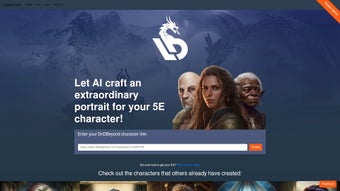

Download LegenDraw – AI‑Powered D&D Portrait Generator
Overview
LegenDraw is an AI‑driven web application built specifically for the Dungeons & Dragons 5e community. Its primary purpose is to turn a simple character sheet link or a JSON export into a richly detailed portrait that reflects the character’s race, class, equipment, and personality. The service runs entirely in the browser, eliminating the need for heavyweight installations, drivers, or platform‑specific binaries.
Whether you are a veteran Dungeon Master looking to give NPCs a visual identity, a player who wants a personalized avatar for a campaign website, or a streamer needing a consistent on‑screen character image, LegenDraw offers a fast, secure, and mostly automated workflow that works on any device with a modern browser. Because the AI processing happens on remote servers, the tool is lightweight and compatible with Windows, macOS, Linux, iOS, and Android without any additional plugins. Users simply paste a character URL from D&D Beyond, Roll20, or upload a JSON file, select a preferred art style, and let the AI generate a portrait in seconds.
While the platform is still in beta, the development team actively solicits community feedback through built‑in sharing buttons, ensuring that new art styles and refinements are added on a regular basis. In short, LegenDraw aims to become the go‑to solution for anyone who wants high‑quality fantasy art without hiring a professional illustrator, while keeping the experience free, secure, and continuously improving.
Key Features & Installation Guide
Feature List
- AI‑generated portrait creation directly from D&D 5e character data.
- One‑click import from major character sheet platforms such as D&D Beyond, Roll20, and Hero Lab.
- Eight distinct art styles ranging from classic oil‑painting to vibrant comic‑book aesthetics.
- Real‑time preview with zoom, rotate, and lighting controls for fine‑tuning.
- Built‑in social sharing for Twitter, Instagram, Discord, and Reddit.
- Beta‑only community feedback loop that influences future updates and new styles.
- HTTPS encryption with no persistent storage of uploaded character data.
- Free tier with unlimited 1080p PNG generation; premium subscription unlocks SVG, higher resolution, and priority processing.
Installation & Usage Instructions
LegenDraw’s “download‑free” nature means you can start creating portraits in under five minutes. Follow these steps for a seamless experience:
- Open a supported browser: Use the latest version of Chrome, Firefox, Edge, or Safari. Ensure JavaScript is enabled and pop‑ups are allowed.
- Navigate to the official site: Go to legendraw.com. The homepage presents a clean dark theme with a prominent “Generate Portrait” button.
- Provide your character data: Paste the URL of your D&D character sheet or click “Upload JSON” to import a local export. The system automatically parses race, class, level, equipment, and background information.
- Select an art style: Browse the carousel of sample styles. Hover over each thumbnail for a live preview. Choose a style that matches the tone of your campaign or personal taste.
- Adjust optional parameters: Use sliders for “Mood,” “Lighting,” and “Detail” to guide the AI toward a more heroic, mysterious, or gritty appearance.
- Generate the portrait: Click “Create Portrait.” The AI, running on cloud GPUs, typically returns a result within 10‑20 seconds. If the output needs refinement, you can regenerate with adjusted settings.
- Download or share: For free users, click “Download PNG” (1080p). Premium members may select “Download SVG” for scalable vector graphics. Use the built‑in icons to post directly to social platforms, adding campaign hashtags for extra visibility.
- Provide feedback: After each generation, a short pop‑up invites you to rate the result and optionally leave a comment. This feedback helps the development team improve model accuracy and add new styles faster.
Because all processing occurs on secure servers, there is no impact on your device’s performance, and no large files are stored locally. Temporary files are automatically erased after a short period, complying with GDPR and ensuring your character data remains private.
Compatibility, System Requirements & Pros/Cons
Operating System Compatibility
LegenDraw is a fully responsive web application, which makes it compatible with any modern operating system that can run a recent web browser. Tested environments include:
- Windows 10/11 – Chrome, Edge, Firefox
- macOS Monterey and later – Safari, Chrome, Firefox
- Linux distributions (Ubuntu, Fedora, Debian) – up‑to‑date browsers
- iOS 14+ – Safari and Chrome (mobile‑optimized UI)
- Android 9+ – Chrome and Firefox (touch‑friendly controls)
The only local requirement is a modest amount of RAM (approximately 2 GB) to handle the UI. No additional plugins, extensions, or runtime environments are necessary.
Pros and Cons
Pros
- Instant portrait generation without any graphic‑design expertise.
- Unlimited free tier makes the tool accessible for hobbyists and small groups.
- Diverse art styles accommodate a wide range of campaign aesthetics.
- Secure, web‑based solution works across all major operating systems.
- Social sharing features foster community interaction and showcase creations.
- Regular updates from an active development team keep the AI current.
- No installation required; works on any device with a browser.
- GDPR‑compliant handling of uploaded character data.
Cons
- Beta status can lead to occasional server latency during peak usage.
- High‑resolution SVG downloads are locked behind a premium subscription.
- Customization options are limited to preset sliders; fine‑grained artistic control is not yet available.
- Requires an active internet connection; offline usage is impossible.
- Rare equipment or custom background elements may be misinterpreted by the AI, necessitating manual tweaks.
- Premium features (priority processing, early‑access styles) add a cost for power users.
Frequently Asked Questions
Below you will find answers to the most common questions about LegenDraw. Each response is written to help new users get started quickly and to clarify how the service handles data, pricing, and usage rights.
Is LegenDraw completely free to use?
LegenDraw offers a free tier that allows unlimited portrait generation at 1080p PNG resolution. A paid subscription unlocks higher‑resolution SVG files, priority processing, and early access to new art styles. The free tier is fully functional for most casual players and DMs.
Do I need to create an account?
No account is required for the free version. If you decide to upgrade to the premium plan, you will need to register with an email address to manage billing and to access higher‑resolution downloads.
Can I use LegenDraw portraits for commercial projects?
Yes. Once you download a portrait, you own the rights to use it in personal and commercial projects, including printed books, streaming overlays, merchandise, and promotional material. The only restriction is that you may not redistribute the raw AI‑generated files as a standalone product.
What browsers are recommended for the best experience?
The latest versions of Chrome, Firefox, Edge, and Safari provide the smoothest experience. Mobile browsers on iOS and Android also work well, though the desktop interface offers more screen real estate for fine‑tuning settings and viewing high‑resolution previews.
How secure is my character data?
LegenDraw uses HTTPS encryption for all data transmission. Uploaded character JSON is processed in memory and deleted within minutes after the portrait is generated, ensuring that no personal data is stored long‑term on the servers. The platform complies with GDPR and other privacy regulations.
Can I customize the portrait beyond the preset sliders?
Currently the AI offers control through “Mood,” “Lighting,” and “Detail” sliders. Direct pixel‑level editing is not available, but you can regenerate the portrait with different settings or use external image editors after download for further tweaks.
Conclusion & Call to Action
LegenDraw fills a noticeable gap in the tabletop‑RPG ecosystem by delivering a fast, affordable, and aesthetically pleasing way to visualize D&D characters. Its AI core produces impressively accurate portraits for mainstream races and classes, while the web‑based delivery removes any friction related to software installation or OS compatibility. The free tier makes the tool accessible to anyone who wants to experiment, and the premium subscription provides the extra polish needed for professional streamers, published authors, or anyone seeking high‑resolution assets. Although the platform is still in beta, the active development roadmap, regular updates, and community‑driven feedback loop promise rapid improvements and new artistic styles in the near future. For Dungeon Masters looking to boost player immersion, or for solo players wanting a personal avatar for character sheets, stream overlays, or social media, LegenDraw offers a compelling solution that lives up to its promise of “exceptional character portraits with just a link.”
Ready to bring your adventurers to life? Visit LegenDraw now, generate a free portrait, and share your creation with the community. The platform’s intuitive interface and zero‑cost entry point let you test the service instantly, while the optional premium plan delivers higher‑resolution assets for professional use. Download LegenDraw today and give your campaign the visual edge it deserves.



.png)



